Your AI is burying your PC in junk.
AI coding tools and AI apps leave gigabytes of hidden waste behind. Old copies. Caches. Scratch folders. Giant model files. Most of it never gets cleaned up. It piles up until your disk is full. And a full disk means a slow PC.
- PC runs slow
- Windows updates fail
- Apps crash
- Can't save your work
AIDustpan finds the mess, shows you how big it is, and sweeps up what you choose.
The kinds of things AIDustpan finds.
AI makes a ton of mess.
You never see it.
Every time an AI tool builds, renders, installs or retries something, it leaves files behind. They hide in folders you never open. Here is what piles up.
Old versions of big files and renders
AI makes a new copy every time it tries again. The old ones stay. One old render can be huge.
60 to 76 GB eachAI tool scratch folders
Working folders your AI tools fill with thousands of small files, then forget.
thousands of filesTemp files
Meant to be temporary. Nobody ever comes back to delete them.
never deletedPackage caches
npm, pip and others keep a copy of everything your AI ever installed.
grows foreverDownloaded AI models
Tried an AI model on your own PC once? It is still there. A single one is often 4 GB or more.
4 GB+ eachLeftovers in old projects
node_modules folders and Python environments, sitting in projects you finished long ago.
in every old projectOld git worktrees
Extra full copies of a project that AI tools make to work in, then leave behind.
whole extra copiesLeftovers from uninstalled apps
You removed the app. Its data stayed on your disk.
app gone, junk staysA Recycle Bin that never gets emptied
Things in the Recycle Bin still take up your disk until the bin is emptied.
still taking spaceThis happened to the maker's own PC.
These are real numbers from one computer: the one AIDustpan was built on. Not a survey. Not a guess.
A 1.86 TB drive, filled by AI work, got down to
Almost every bit of a huge drive, taken.
Reclaimed so far
What AIDustpan has swept off that one PC so far.
Freed in one automatic clean
One automatic clean, on its own. Nobody had to tick a thing.
Old items in one folder
Found inside a single Claude Code scratch folder.
A full disk is a slow PC.
Windows needs free space to do its job. It uses it for updates, for its page file (where it puts things when memory runs out) and for temporary work. When the disk is nearly full, things start to break.
Updates fail to install
Windows has no room to download and unpack them. So your PC stays out of date.
Programs slow down or crash
They have nowhere to put their working files, and Windows has nowhere to overflow memory.
You can't save
No space left means your own work has nowhere to go.
AIDustpan sweeps it up.
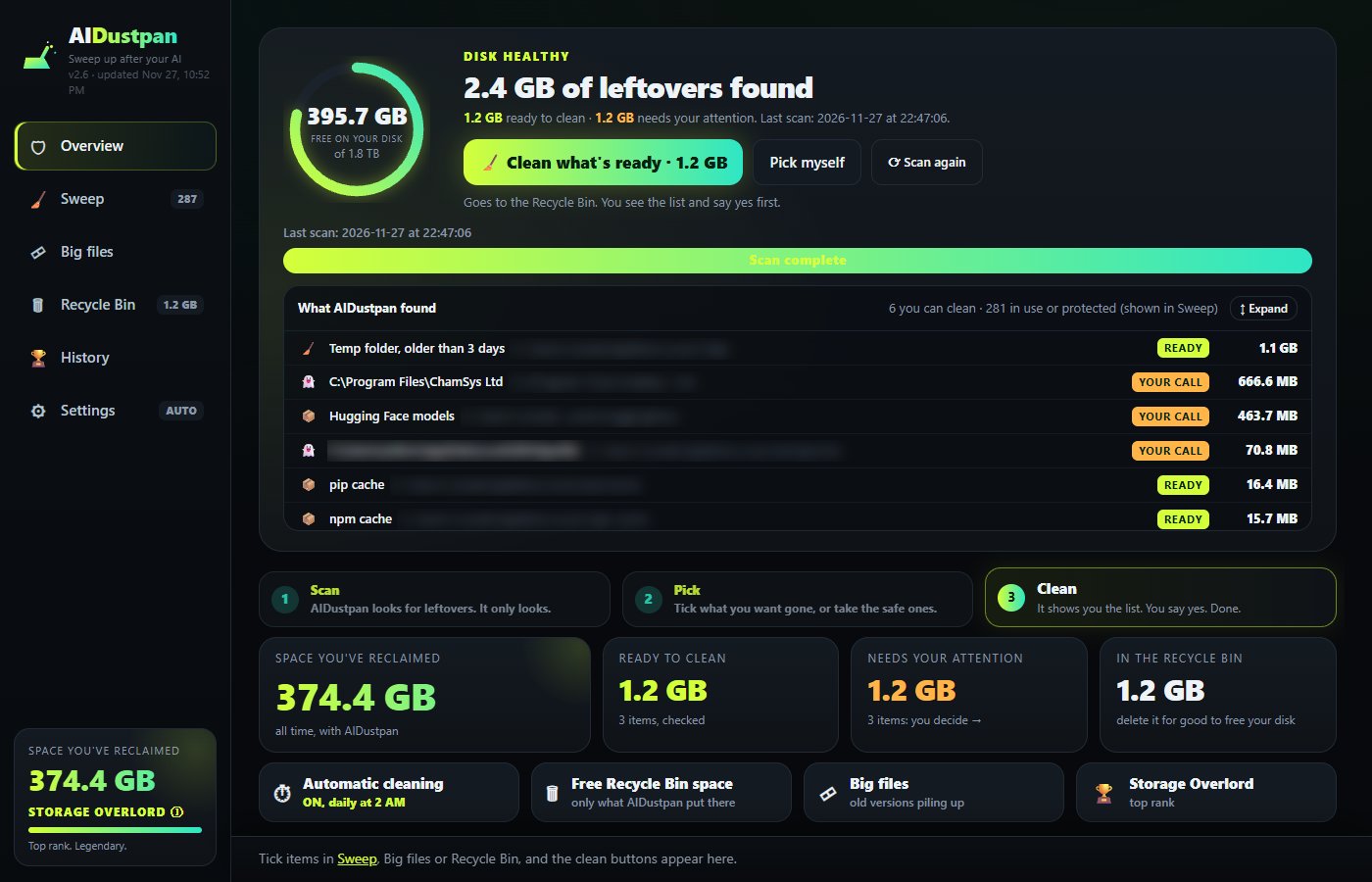
A Windows app that finds the junk AI left on your PC, tells you what each piece is in plain words, and removes only what you choose.
It finds what AI left behind
One scan. Every item comes with its size and a plain reason why it is safe to clear.
Nothing goes until you say yes
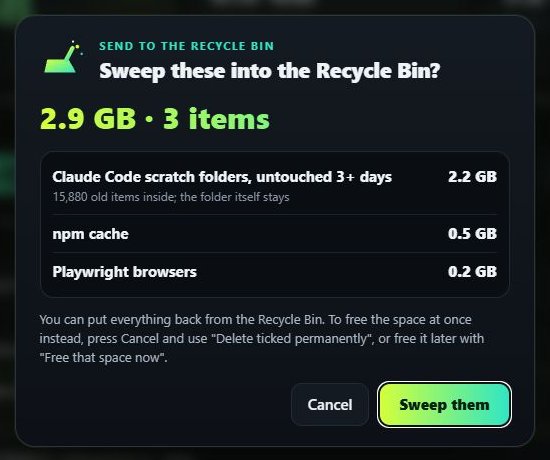
Nothing is removed until you tick it and say yes. You are always in charge.
Recycle Bin first
Things go to the Recycle Bin by default, so you can put them back. Deleting for good is a separate, clearly marked choice.
An undo log of every clean
Every clean is written down. You can always see what was moved and when.
Never touched
Some things are off limits, always.
- Backup copies
- The newest version of a file
- Anything a running program is using
- Your Documents, Desktop and Pictures
- Windows itself
- Your AI chat history
Or let it clean while you sleep
An optional switch. Turn it on and AIDustpan runs every night at 2 AM. It takes only the items marked ready to clean. Everything else waits for you.
That is how one automatic clean freed 305.6 GB on the maker's PC.
The more you reclaim, the higher you climb.
- Rookie SweeperStart here
- Dust Buster1 GB
- Clean Machine10 GB
- Disk Reclaimer25 GB
- Byte Bouncer50 GB
- Gigabyte Slayer100 GB
- Storage Overlord250 GB
Plain words. Real sizes.
Get your disk back.
AIDustpan is not out yet. Leave your email and you will hear the day it is.
Only news of AIDustpan and other new Wicksong things. Never sold or shared.